The Kitchen Inventory That Fills Itself In
Every pantry app ever made has the same fatal flaw: you have to keep it updated. Custrd Kitchen doesn't have that flaw — the fridge scans you already take to find dinner quietly build and refresh a digital copy of your fridge and pantry, expiration dates included. You cook; it bookkeeps.
A Kitchen Inventory You Never Have to Maintain
Kitchen inventory apps, pantry trackers, expiry-reminder apps — they all work until the third week, when updating them starts feeling like a second job. Typing in groceries, scanning barcodes one item at a time, deleting what you ate: the maintenance is why most people quit.
Custrd flips the direction of the work. You point your camera at your fridge or pantry because that's how you find something to cook — and as a side effect of every scan, your Kitchen updates itself. New ingredients appear, existing ones refresh, and each item gets a shelf-life estimate the moment it lands. The Kitchen grows on its own in the background, just from you using the app.
When you do want to add something deliberately, every fast path is there: snap a photo, scan a barcode, say it out loud, or type it in. Four ways in, none of them homework.
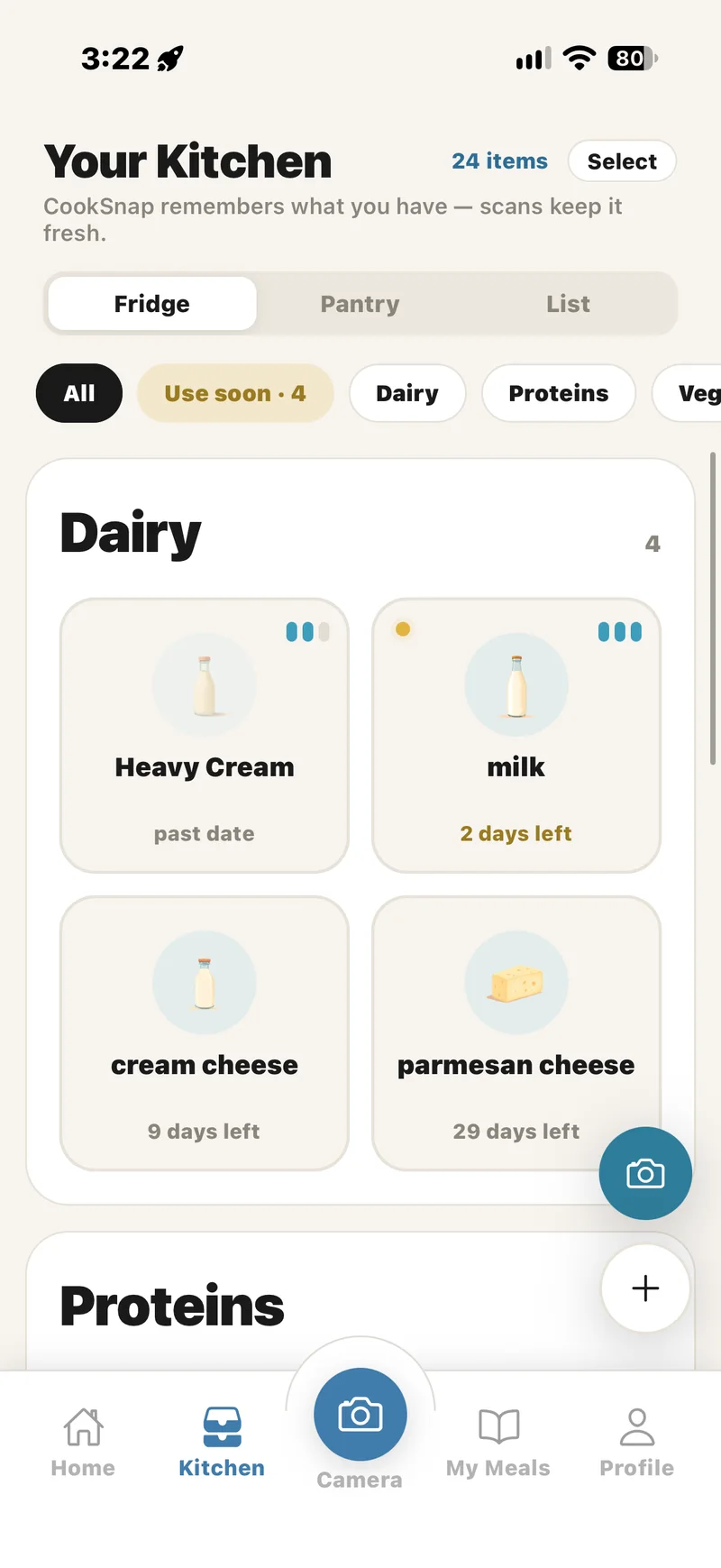
Fridge, Pantry, List — and Staples That Never Expire
The Kitchen is organized the way your real kitchen is. The Fridge board holds the perishables, grouped by category with a freshness readout on every card. The Pantry board holds the shelf-stable goods. The List board is your shopping list — the bridge between what you have and what you need.
That list can be shared. Invite the people you actually shop with and it syncs live: someone adds milk from the kitchen, whoever is standing in the aisle sees it appear — no screenshots, no “did you get it?” texts. Custrd Pro covers up to 10 shared lists of 15 people each — room for a whole household, or several.
Ingredients you always keep around — salt, olive oil, rice — get marked as staples once. From then on Custrd assumes you have them: they never expire out of your inventory, they survive every rescan, and recipe matching always counts them. You stop photographing your salt shaker.
Expiration Dates, Handled Like a Person Would
When milk enters your Kitchen, it gets days. When potatoes enter, they get weeks. Custrd assigns a sensible shelf-life estimate per ingredient type automatically, and every date stays editable — nudge it a day at a time, type an exact number, or pick a date from the calendar.
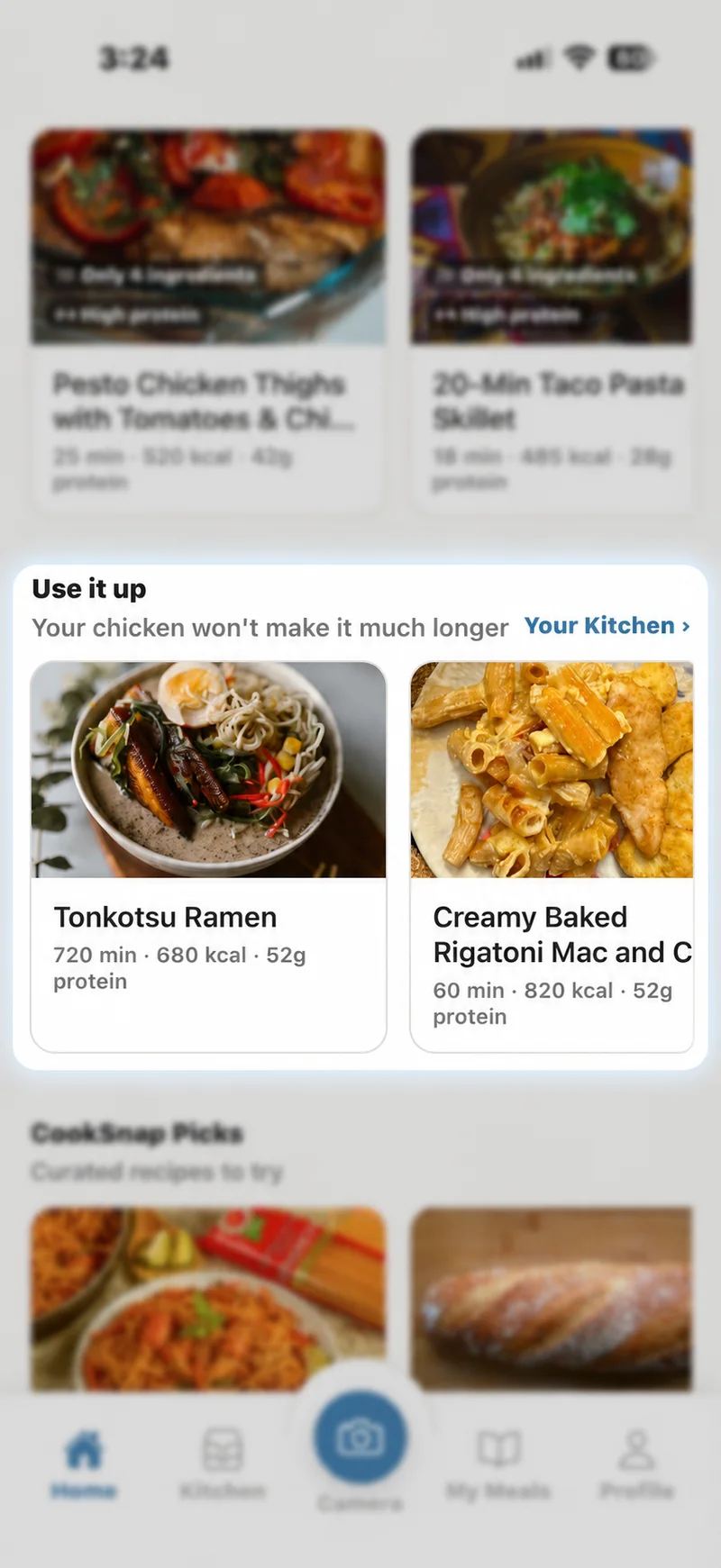
The point of the dates isn't the dates — it's what happens next. Anything running out lands in the Use soon filter, and your home screen starts suggesting real meals that use those exact ingredients, matched to your dietary goals. That's the difference between an expiry reminder (“your chicken is dying”) and a plan (“here are two dinners that use it tonight”). If reducing food waste is the goal, this is the mechanism that actually does it.
An Inventory Your AI Chef Can Read and Write
Custrd Insights — the app's AI chef — is fully connected to your Kitchen. Tell it “add eggs, butter, and spinach,” “the cream expires Friday,” or “what should I cook before the chicken turns?” and it edits the inventory or answers from it directly. The Kitchen is also what powers recipe matching: the more accurate it is, the better every meal suggestion gets — and it keeps itself accurate.
When something's missing, the List board picks it up, and any ingredient can be sent to the Instacart® app, ready to shop — you choose the store and check out in your own account. From “the fridge is empty” to “groceries are on the way” without leaving Custrd.
Why This Beats Manual Pantry Trackers
A pantry tracker is only as good as its last update. Manual apps decay because the human is the sync mechanism; the moment you skip a grocery trip's worth of data entry, the inventory is fiction and the app is dead weight. Custrd's Kitchen stays honest because the update happens inside the action you were already doing — scanning your fridge to figure out dinner. No streaks to maintain, no barcode ritual, no second job.
And because the inventory lives next to a library of recipes, it never sits idle: every ingredient in your Kitchen is permanently one match away from being dinner.
Frequently asked questions
- What is Custrd Kitchen?
- Custrd Kitchen is a digital copy of your real kitchen inside the Custrd app, organized into three boards: Fridge, Pantry, and List. Every ingredient carries a freshness estimate, a 'Use soon' flag when time is running out, and the whole inventory feeds Custrd's recipe matching — so meal suggestions come from what you actually have, including what needs using first.
- Do I have to type in my groceries like other pantry apps?
- No — this is the main difference. Most pantry inventory apps make you type every item or scan barcodes one at a time. Custrd builds your Kitchen from the fridge and pantry photos you were already taking to find recipes: each scan adds and refreshes ingredients automatically, so the inventory grows in the background just from you using the app. When you do want to add something directly, there are four fast paths — snap a photo, scan a barcode, say it out loud, or type it in.
- How does Custrd know when my food expires?
- When an ingredient lands in your Kitchen, Custrd assigns a sensible shelf-life estimate for that type of food — milk gets days, potatoes get weeks. Every date is editable: you can nudge it by a day, type an exact number, or pick a date. Items nearing their date surface in the 'Use soon' filter and in Use-it-up meal suggestions on your home screen.
- What are pantry staples?
- Staples are ingredients you always keep on hand — salt, olive oil, rice, whatever you never run out of. Mark an item as a staple once and Custrd assumes you have it from then on: it won't expire out of your Kitchen and won't disappear after a rescan, so recipe matching always counts it.
- Can I manage my Kitchen by just asking the AI?
- Yes. Custrd Insights — the in-app AI chef — is connected to your Kitchen. In plain language you can ask it to add or remove ingredients, change an expiration date, or find meals that use what's about to go bad, and it updates the Kitchen for you.
- Does the Kitchen help with shopping too?
- Yes. The List board collects what you need to buy, and it can be shared with the people you shop with — adds and check-offs sync in real time, so whoever is at the store always has the current list. Custrd Pro includes up to 10 shared lists of 15 people each, and joining someone else's list never counts against your own limit. Any ingredient can also be sent to the Instacart® app to shop — you pick the store and check out in your own Instacart account, in regions where the Instacart service operates. Custrd never places orders for you.
Try Custrd free for 7 days on iPhone — scan your fridge and get real recipes you can cook tonight. Then $39.99/year, cancel anytime.
Try Custrd free for 7 days