Every Recipe Lists the Kitchen Tools It Needs
Every recipe in Custrd lists its equipment next to its ingredients, so you know what you need before you start. When a tool is missing, Find one opens an Amazon search for it. This page explains how that works, what it does not do, and how Custrd is paid.
How It Works
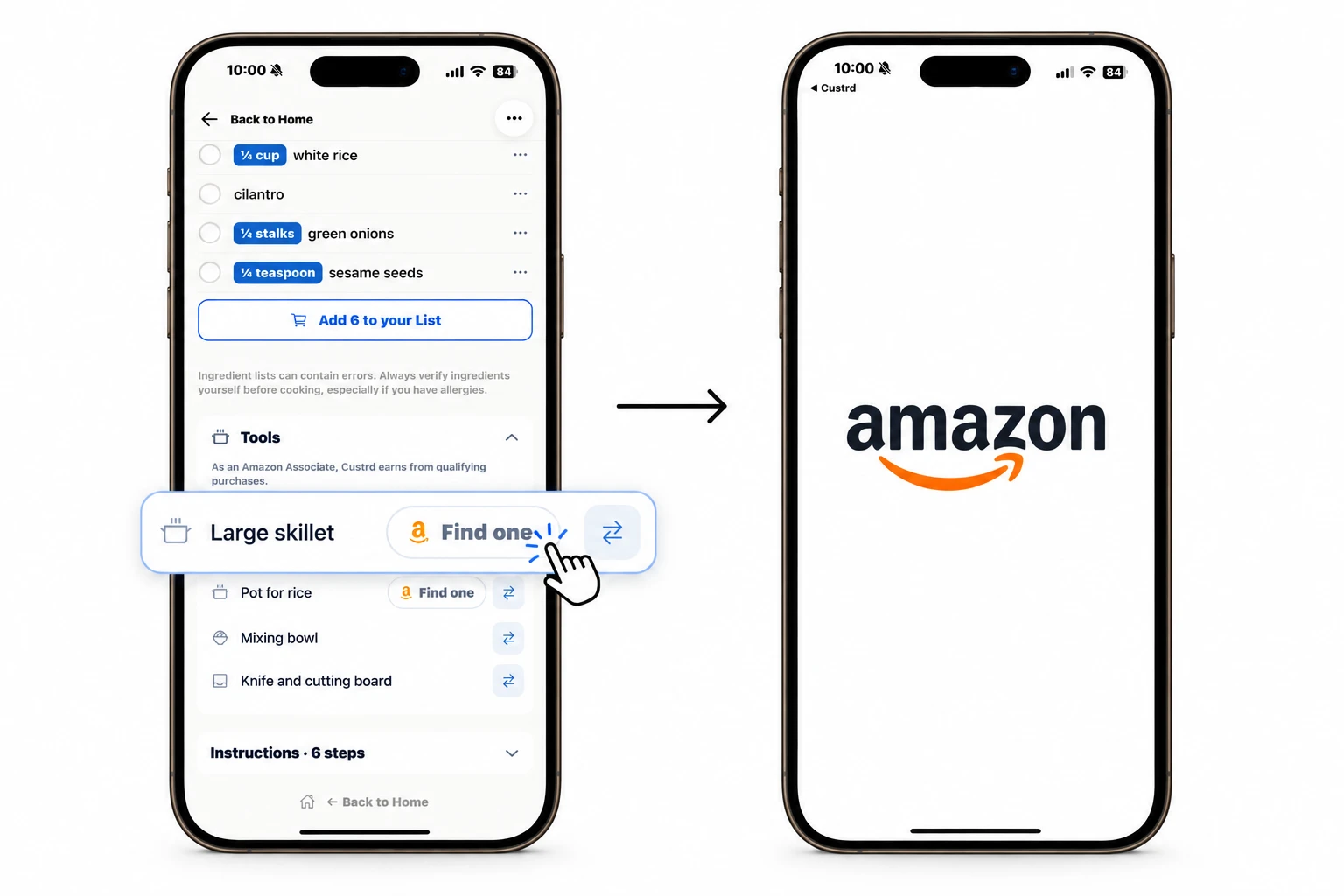
- Open a recipe. The Tools section lists the cookware and equipment it uses, directly under the ingredients.
- Check what you're missing. Tools you may not own show a Find one button. Everyday items — bowls, knives, cutting boards — do not.
- Tap Find one. Amazon opens with a search for that tool in Home & Kitchen. You compare and buy in your own account.
What Find One Does — and Does Not Do
- It opens a search for the tool, not a specific product page.
- It shows no prices, ratings or product photos inside Custrd.
- It does not choose, rank or recommend a product.
- It does not place an order or connect to your Amazon account.
Cooking Without a Tool
Buying is not the only option. With Custrd Pro, the swap control on each tool row suggests another way to make the dish with equipment you already own — a whisk in place of a stand mixer, for example.
Groceries and Kitchen Tools
Custrd handles a recipe's shopping in two parts. Missing ingredients can be sent to the Instacart® app, ready to shop from a local store. Equipment opens an Amazon search. Custrd places no orders on either, and both start from what you already have in your Kitchen.
How Custrd Is Paid
Custrd is a member of the Amazon Associates program. If you buy something on Amazon after tapping Find one, Custrd may earn a commission, at no extra cost to you. Commissions do not affect which tools a recipe lists or which tools get a Find one button.
As an Amazon Associate, Custrd earns from qualifying purchases. Amazon and all related marks are trademarks of Amazon.com, Inc. or its affiliates. Instacart is a registered trademark of Maplebear Inc., d/b/a Instacart. Custrd is not endorsed by or affiliated with Instacart.
Frequently asked questions
- What is the Tools section on a Custrd recipe?
- Every recipe in Custrd's library lists the cookware and equipment it uses, such as a large skillet, a pot for rice or a meat thermometer, directly under its ingredients. You can see what a recipe needs before you start cooking.
- What does the Find one button do?
- It opens Amazon, in the app or on the website, with a search for that tool in Home & Kitchen. Custrd does not choose a product, show a price or handle the purchase; you compare and buy in your own Amazon account.
- Why do some tools not have a Find one button?
- Tools almost every kitchen already has, such as a bowl, a knife, a cutting board or a plate, are left without one. The button appears only on equipment you may not own, such as a dutch oven, a stand mixer or a meat thermometer.
- Does Custrd show prices or recommend specific products?
- No. Find one opens a search, not a product page. Custrd shows no prices, ratings or product photos and does not rank or recommend products.
- Does Custrd earn money from Find one?
- Custrd is a member of the Amazon Associates program. If you buy something on Amazon after tapping Find one, Custrd may earn a commission, at no extra cost to you. Commissions do not affect which tools a recipe lists or which tools get a Find one button.
- Can I cook a recipe without one of its tools?
- Often, yes. With Custrd Pro, the swap control on each tool row suggests another way to make the dish with equipment you already own.
Custrd is on the App Store and Google Play (7-day free trial). The recipe finder on this site is free, with no signup.